
Water damage repair in Tampa, FL for laptops, MacBooks, iMacs, desktops, and gaming PCs. Liquid damage diagnostics, corrosion cleaning, board-level inspection, and data recovery options.
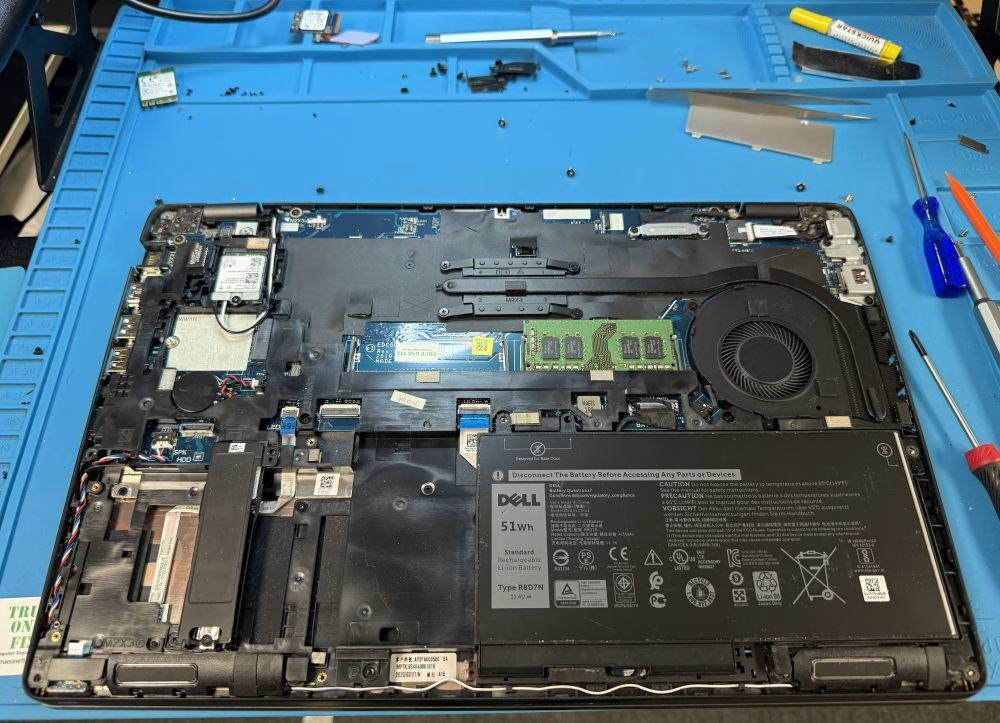
Professional Water Damage Repair in Tampa
Trueonefix provides liquid damage diagnostics and repair for laptops, MacBooks, iMacs, desktops, and gaming computers affected by water, coffee, soda, tea, coolant leaks, or other spills.
With over 28 years of hands-on computer repair experience and hundreds of verified Google reviews, we focus on careful inspection, honest repair options, and protecting your data whenever possible.
- Free diagnostics for most liquid damage cases
- Board-level inspection for corrosion and short circuits
- Data recovery options when full repair is not possible
- Repairs starting at $95
- 90-day labor warranty on completed repairs
Why Tampa Customers Choose Trueonefix for Liquid Damage Repair
⭐ Verified Google Reviews
Hundreds of Tampa customers trust Trueonefix for honest computer repair and dependable service.
🛠 Board-Level Diagnostics
We inspect the motherboard, ports, keyboard, trackpad, charging circuit, and visible corrosion before recommending repair.
💾 Data-First Approach
If full repair is not cost-effective, we focus on recovering important files whenever possible.



Common Liquid Damage Symptoms
Liquid damage does not always look serious from the outside. Even a small spill can cause corrosion, short circuits, keyboard failure, charging problems, or no-power issues if it reaches internal components.
- Laptop or MacBook will not turn on after a spill
- Keyboard or trackpad stops working
- Screen flickers, shows lines, or stays black
- Device powers on and shuts off again
- Charging port or USB ports stop working
- Fan noise, overheating, corrosion, or sticky residue appears inside the device
What To Do After a Liquid Spill
The first few minutes after a spill matter. Using or charging the device while liquid is inside can make the damage worse.
- Turn the device off immediately.
- Unplug the charger and remove external devices.
- Do not keep pressing the power button to test it.
- Do not use a hair dryer, oven, or heat gun.
- Do not put the laptop in rice. Rice does not clean corrosion or sticky residue from the motherboard.
- Bring it in as soon as possible for professional inspection.
For Apple’s official information about liquid damage, you can visit Apple Support.
Water Damage Repair Services
Every liquid damage case is different. We inspect the device before confirming what can be repaired, what should be replaced, and whether data recovery is the better option.
- Laptop water damage repair
- MacBook liquid damage repair
- iMac and desktop liquid damage inspection
- Gaming PC coolant leak diagnostics
- Corrosion cleaning and board inspection
- Keyboard and trackpad replacement
- Charging port and USB port diagnostics
- Data recovery after liquid damage

MacBook Liquid Damage Repair
MacBook liquid damage can affect the keyboard, trackpad, battery, USB-C ports, display, charging circuit, and logic board. Coffee, soda, tea, and sugary drinks often leave residue that continues damaging components after the liquid dries.
We inspect MacBook Air and MacBook Pro models for corrosion, short circuits, damaged connectors, and board-level faults. If repair is not practical, we can discuss data recovery options.
For general Apple laptop service, visit our MacBook Repair Tampa page.
Data Recovery After Water Damage
When a water-damaged laptop or MacBook cannot be repaired affordably, the most important goal may be saving your files. We can check the internal storage and determine whether photos, documents, work files, school files, or business data can be recovered.
If the storage device is still readable, we can transfer the data to an external drive or new computer. If the storage device is damaged, recovery depends on the condition of the drive and the level of liquid exposure.
For more details, visit our Data Recovery Tampa page.
Our Water Damage Repair Process
- Initial inspection: We check the device condition, spill area, power behavior, visible corrosion, and customer symptoms.
- Internal inspection: We open the device and inspect the motherboard, connectors, keyboard, trackpad, charging port, and affected areas.
- Cleaning and corrosion removal: When repair is possible, we clean affected areas using professional tools and proper methods.
- Board-level testing: We test power rails, charging circuits, shorted components, keyboard connections, and display behavior where needed.
- Estimate and approval: We explain the condition of the device and provide repair options before starting work.
- Final testing: We test charging, display, keyboard, trackpad, ports, Wi-Fi, stability, and normal startup before pickup.
Can Water-Damaged Devices Always Be Repaired?
No repair shop can honestly guarantee success with liquid damage. The outcome depends on the type of liquid, how much entered the device, how long it stayed powered on, and how quickly it was brought in for service.
Clean water may cause less residue than coffee, soda, juice, salt water, or sugary drinks. A device that was powered on after the spill may have more severe board damage than one that was turned off immediately.
Our goal is to give you a clear assessment. If full repair does not make financial sense, we will explain that and focus on practical options such as data recovery.
Related Repair Services
Liquid damage can affect several areas of a computer. These related services may apply depending on the damage.
Water Damage Repair Service Areas
We serve Tampa, Carrollwood, Temple Terrace, Lutz, Wesley Chapel, New Tampa, Tampa Palms, Citrus Park, USF, Lake Magdalene, Westchase, Brandon, Riverview, and nearby Tampa Bay communities.
FAQ – Water Damage Repair Tampa FL
Can a water-damaged laptop be repaired?
Sometimes. Repair depends on the liquid type, the affected components, corrosion level, and whether the device was powered on after the spill. We inspect the device and explain the realistic repair options.
Should I turn on my laptop after a spill?
No. Do not power it on or charge it. Turning on a wet device can cause short circuits and more severe motherboard damage.
Does rice fix laptop water damage?
No. Rice does not remove corrosion, residue, or liquid under chips and connectors. Professional cleaning and inspection are needed to evaluate the damage.
Can you recover data from a water-damaged laptop?
Often, yes. If the storage device is still readable, we can recover or transfer files. If the storage is damaged, recovery depends on the condition of the drive.
Do you repair MacBook liquid damage?
Yes. We inspect MacBook Air and MacBook Pro models affected by water, coffee, soda, or other liquid spills.
How quickly should I bring it in?
As soon as possible. Corrosion can spread over time, especially if the device remains powered or wet internally.
Do I need an appointment?
Walk-ins are welcome. You can also call ahead or book online if you prefer a scheduled visit.
Visit Our Water Damage Repair Shop in Tampa
Visit Trueonefix Computer Repair Shop for liquid damage diagnostics, corrosion cleaning, laptop water damage repair, MacBook liquid damage repair, board-level inspection, and data recovery options.
Trueonefix Computer Repair Shop
104 E Fletcher Ave, Tampa, FL 33612
Phone: 813-438-2888
Website: trueonefix.com
Need Water Damage Repair in Tampa?
If liquid spilled on your laptop, MacBook, desktop, or gaming PC, turn it off and bring it in for professional inspection as soon as possible.
104 E Fletcher Ave, Tampa, FL 33612